iroh language support
by okdistributeWe’re excited to announce Swift, Kotlin, Python, and JavaScript bindings with first-party support for iroh!
The bindings expose QUIC data streams. From any device, you can quickly open a direct connection to any other device, either across the room or across the world, as long as you know its EndpointId.
As endpoints connect, you can monitor their direct data rate: the percentage of traffic sent directly between devices instead of over relays. Expect a 95–99% direct connection rate, depending on your use case and where in the world you deploy. The small amount of traffic that does go over a relay is always end-to-end encrypted.
Platforms supported
Iroh supports all major platforms:
- iOS
- macOS (arm64, no Intel build)
- Android
- Linux
- Windows
- FreeRTOS
For per-language details, see the platform support matrix.
Quick accelerometer demo
To get started with the bindings, follow the getting-started guide for your language of choice.
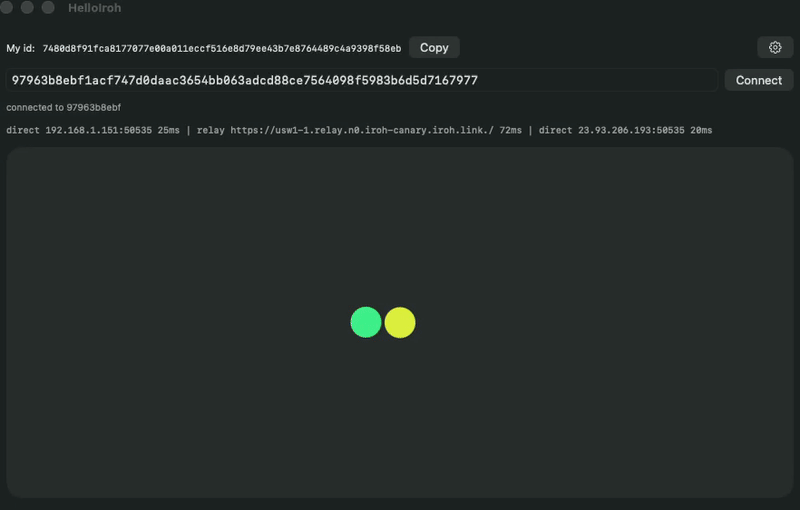
For an out-of-the-box demo, check out our accelerometer demo.
Each peer controls one dot in a shared coordinate space. You move your dot by tilting the phone or dragging on the desktop, and you stream its position to the other peer at ~60 Hz over an iroh bi-directional stream. The peer renders your dot at the same coordinates next to its own, so both screens show the two dots tracking each other in real time.
The two peers are fully symmetric. While connected, a line under the status shows the connection's live network paths — direct vs. relay, remote address, and RTT — so you can watch iroh hole-punch its way from a relayed connection to a direct one.
Sending streaming data
Once two endpoints are connected, you talk over plain QUIC streams. Open a bi-directional stream with openBi() on the dialing side and accept it with acceptBi() on the other, then write bytes into one end and read them out the other. Streams are ordered, backpressured, and end-to-end encrypted, and a single connection can carry as many of them as you need. There's no broker or polling loop in the middle.
Most apps will have a similar shape in every language:
- a send loop
- a receive loop
Here's what that looks like in Swift for the accelerometer demo:
// Dial a peer anywhere in the world by its EndpointId
let addr = EndpointAddr(id: peerId, relayUrl: nil, addresses: [])
let conn = try await endpoint.connect(addr: addr, alpn: WireFormat.alpn)
let bi = try await conn.openBi() // the other side calls conn.acceptBi()

// Send loop: stream your dot's position at ~60 Hz
Task {
    let send = bi.send()
    while !Task.isCancelled {
        let frame = WireFormat.encodePosition(x: game.myPos.x, y: game.myPos.y)
        try await send.writeAll(buf: frame)
        try await Task.sleep(nanoseconds: 16_666_000)
    }
}

// Receive loop: read the peer's frames as they arrive
Task {
    let recv = bi.recv()
    while !Task.isCancelled {
        let body = try await recv.readExact(size: WireFormat.positionFrameSize)
        if let pos = WireFormat.decodePosition(body) {
            game.receivedTheirPos(x: pos.x, y: pos.y)
        }
    }
}
Monitor your application performance
In any of the languages, you can also diagnose application performance and see direct data rate per endpoint by connecting an Iroh Services API key.
In Swift, for example, it’s one call to enable services monitoring:
let client = try await ServicesClient.create(
    endpoint: endpoint,
    options: ServicesOptions(apiSecret: "YOUR_API_KEY", name: "my-endpoint")
)
The metrics dashboard helps you answer questions like:
- How many endpoints are online right now?
- How much of my traffic is direct vs. relayed? High relay usage can signal application code or deployment issues.
- What is my throughput over time: data sent and received, broken down by connection type (direct IPv4, direct IPv6, or relayed)?
- What version of iroh are my endpoints running?
Diagnosing a connectivity issue
From any of the bindings, you can manually submit a network diagnostics report to iroh services:
try await client.submitNetworkDiagnostics(send: true)
This sends a network diagnostics report, covering NAT type, UDP connectivity, relay latency, port mapping protocol availability, and direct addresses. Everything you need to debug connection issues.
Future work
Right now, the bindings support creating real-time data streams between two or more devices. In the future, we’d like to also add support for popular use cases, such as RPC, gossip, blobs and documents.
Soon we will also introduce out of the box mDNS and Bluetooth support in the FFI; right now, these are Rust-only features because the custom transport API is still not 100% stable. Stay tuned.
You don’t have to wait, though: the stream API is already everything you need to build production-grade powerful, low-latency apps today.
To get started, take a look at our docs, dive directly into the code, or chat with us in our discord channel.